
How to Change Steam Region: Full Guide to Switching Your Steam Country

There can be many reasons why users might want to change their Steam region. First, you have moved to a different region and want to update your Steam wallet. Or you are seeing game prices in a foreign currency. But then you think of the big question: how to change the Steam region and whether it is even possible?
Your Steam region is set the moment you make your first purchase on Steam, which is why many users struggle when trying to change their country on Steam later. But the good news is, it isn’t immutable, and you can actually change your Steam location.
Steam region settings determine your payment methods, the prices you see, and regional availability of certain games. While it doesn’t affect CS2 matchmaking directly, it can impact the cost of in-game items, including the skins you might want to win on SkinsLuck, a platform where you can win CS skins, where every drop depends on luck and regional pricing.
In this guide, you will learn exactly how to change your Steam region safely, legitimately, and without putting your account at risk. You will also learn the difference between Steam region settings and CS2 matchmaking regions, and how to adjust both.
How to Change Steam Country or Region Step by Step
Step 1: Log In and Open the Steam Store
The first step in understanding is logging in to your account from your new physical location. So if you have moved to a new country, you need to be physically present in the new country, using the local internet to connect to Steam. This is the prerequisite for Steam to allow you to update your region. For the next step, we need to open the Steam Store to make a transaction.

Step 2: Add an Item to Your Cart
Steam will only let you adjust your region by checking out an item. You need to add any paid item to your cart. Keep in mind that it does not need to be expensive. Just add something cheap so you can see an option to change the country on Steam.
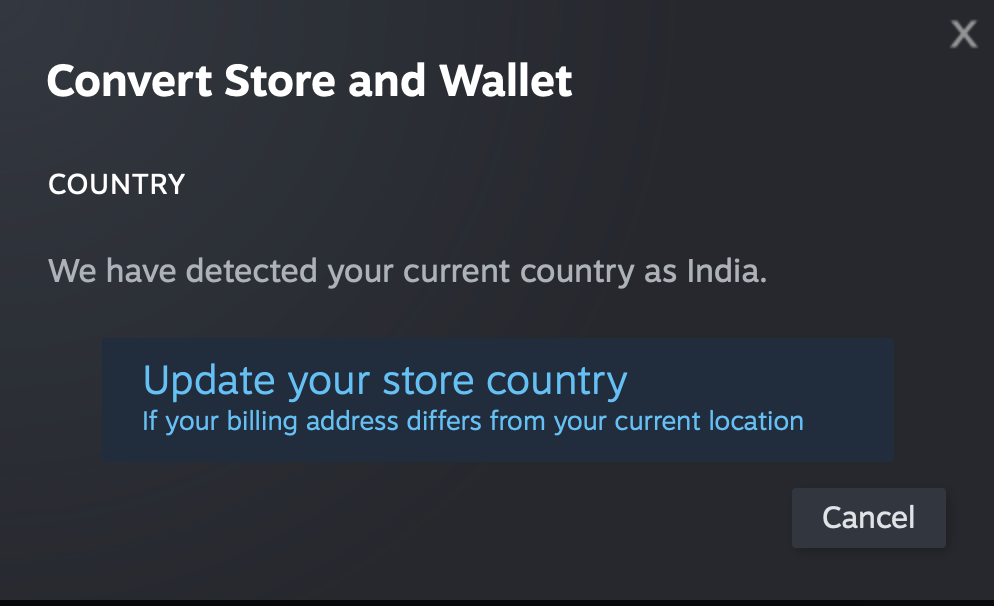
Step 3: Select Update Store Country
During checkout, Steam may detect that you are in a new location and prompt an “Update Store Country” option. You can only proceed if Steam identifies:
• You are physically located in that region
• Your system’s default IP address confirms it
This is one of the most important steps for anyone searching for how to change the Steam region, since it’s where most users get blocked.
Step 4: Add a Valid Local Payment Method
The penultimate step to update your region is to add a valid local payment method. Steam needs a payment method issued in the country you are switching to. To make the payment, you can use credit cards, debit cards, or local e-wallets that match your new billing address. This rule helps prevent users from trying to access cheaper regions illegitimately.
If the payment method is not issued in the same country you selected, your region change is going to fail.
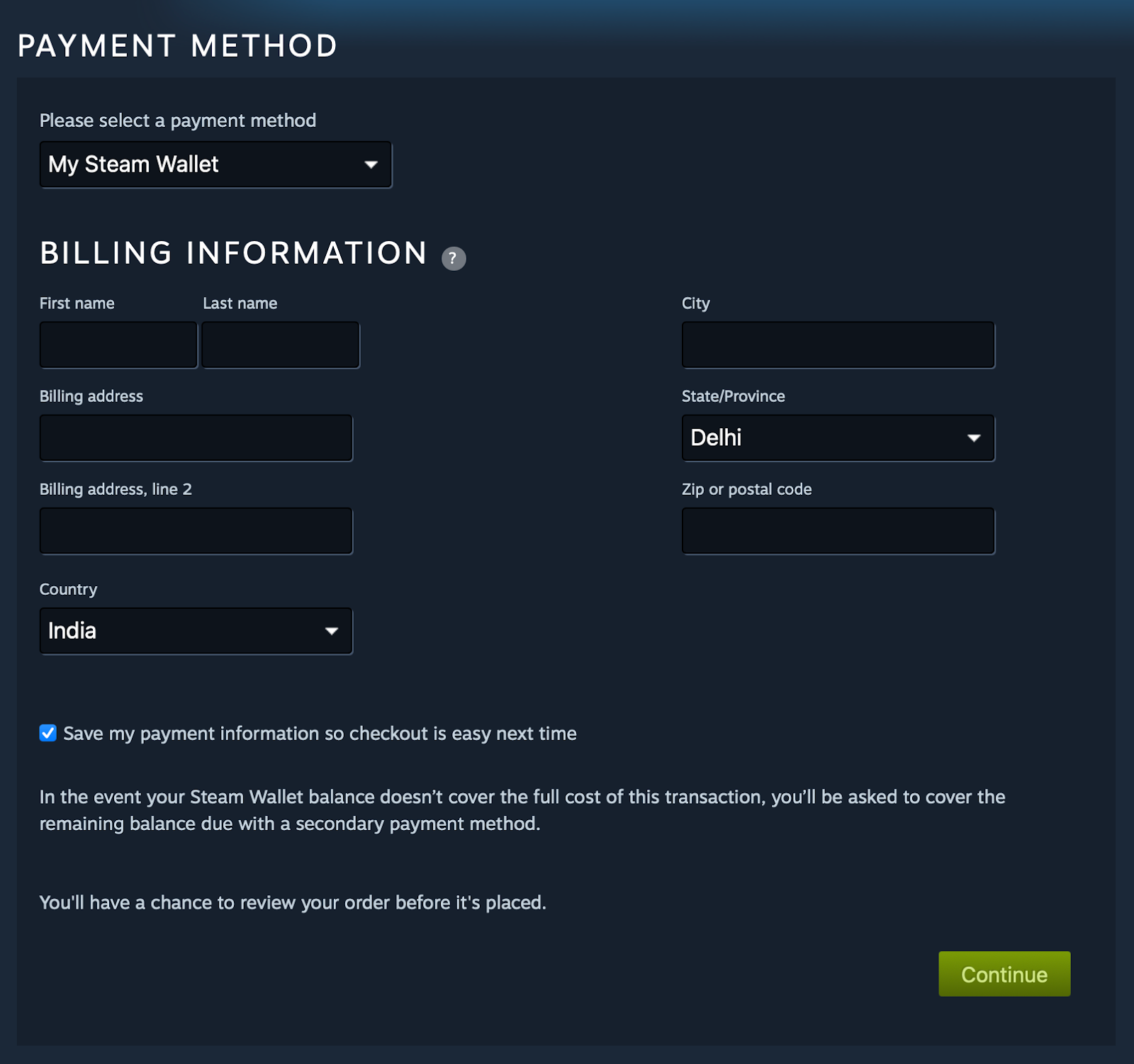
Step 5: Complete the Purchase
Once you have successfully added a local payment method, you need to complete the checkout. After the purchase, your Steam country will update automatically. Note that Steam may review your account if your payment details look suspicious or if you request a refund immediately afterward. In many cases, Steam reverts to the country if something does not match.
What Are Steam Region Settings?
What a Steam Region Actually Controls
Before you fully understand how to change the Steam region, you need to know what the Steam Region Settings actually control. Steam region settings affect the store currency you use, the prices that are displayed to you, available payment methods, and which region-locked games you can buy. Games with specific license restrictions may not appear outside certain regions, and some DLC may also differ. Steam uses region-based pricing, so switching your country affects how much you pay. Interestingly, the price of some of the items differs depending on the region or currency change. A 2016 study revealed that the Case Key rates were the most expensive in India and the least expensive in Canada.
How Steam Determines Your Store Country
The Store Country is first set when you make your first purchase and your payment method. It does not simply change when you use a VPN. Steam determines your Store Country based on the following factors:
• Your physical IP address
• The billing address on your payment method• The country of your last successful purchase
This is why you cannot change region frequently or arbitrarily. When people search for how to change location on Steam or how to change country on Steam, these checks are usually the reason it fails.
Steam Store Country vs CS2 Matchmaking Region
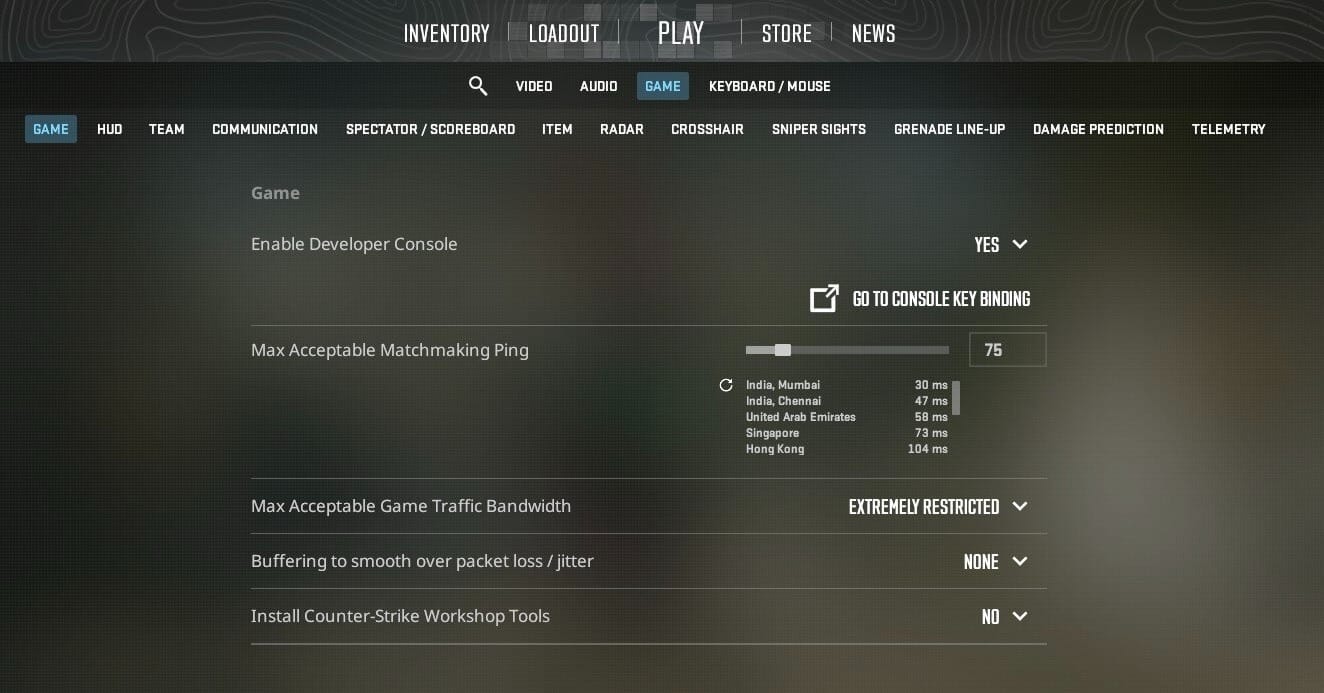
Your Steam country does not control Counter-Strike 2 servers. CS2 matchmaking uses your physical location and the "Maximum Acceptable Ping" to connect you to nearby servers. However, if you move to a different country, your ping will naturally change because you are closer to different server clusters. You can manually adjust your acceptable ping, which can help you restrict the region you want to queue in.
Why Steam Limits Region Switching
Steam allows region changes, but only if you actually live in that country. It is a key detail many people miss when searching for how to change Steam region. Without these protections, users could exploit cheaper regions to buy games at unfair prices. It also prohibits any fraudulent access to region-locked content. That is why Steam follows strict rules around IP verification, proof of location, and purchase records.
How Steam Region Works and Why You Can Only Change It Under Certain Conditions
Steam ties your store region directly to your billing address and payment method. To legitimately switch countries, you must physically live in the new region and give them proof of location, which is usually a valid local payment card issued there. Steam may also request proof if your activity looks suspicious.
You cannot change your region often, and you cannot repeatedly switch back and forth. Steam checks your IP, payment location, and occasionally requires additional authentication to confirm you actually reside in the new country.
Changing your Steam country affects the storefront, game availability, and the currency displayed. It does not affect your installed games, cloud saves, or CS2 matchmaking. CS2 servers are chosen based on the ping you have set in the game settings, so your store region has no impact on where you are queued.
These rules apply to everyone, which is why understanding how to change the Steam region and how to change the Steam region is important when relocating.
Changing CS2 Region vs Changing Steam Country
Many players think that changing the Steam region will also affect CS2 servers, but it only changes your Steam Store. It alters currency, pricing, and available payment methods, but not your game servers. CS2 matchmaking uses its own system, and you can pick server regions manually inside the game settings.
If you want to adjust where CS2 queues you, you need to change your in-game matchmaking region, not your Steam country.
How to Change Your CS2 Region
There is no direct way to change your CS2 Region. But you can influence the region you want to queue in by changing your “Maximum Acceptable Ping”. Open CS2 and go to the Settings menu. From there, select the Game tab and look for the “Maximum Acceptable Ping” setting.
Setting this value higher will connect you to servers with higher ping, meaning you may get a match from a far away region. And vice versa, setting it low will help you find a match on nearby servers. But keep in mind that you may need to wait longer if you set the maximum ping too low.
You can also use third-party tools like CS2 Server Picker to ban servers you don’t want to play on. This can help you if you are getting queued in foreign servers where players speak a different language.
Keep in mind that server availability varies based on time of day and location. For example, some players in South Asia see more options during peak hours, while players in North America receive broader coverage.
It is advisable to avoid using a VPN to force matchmaking into a different CS2 region. Doing so may trigger trust factor issues or matchmaking restrictions. CS2’s anti-cheat systems treat suspicious routing as a potential sign of cheating or abuse.
If you want lower ping, try:
- Avoiding regions that are physically far
- Playing at times when your local servers are active
- Checking for background apps using your bandwidth
- Contacting your ISP if nothing else works
Changing your CS2 region is safe and fully allowed, unlike trying to spoof your Steam country using a VPN. This difference is important when players look up how to change region CS2 or how to change country Steam. They are two separate systems.
Top Tips for Safely Changing Your Steam Country
Only change your region if you have really moved; this is the foundation of how to change your Steam region without risking account flags. Avoid putting your account at risk by attempting a false region change. Always use a valid payment method issued in your new location. This is the biggest requirement for how to change country on Steam or how to change region on Steam correctly.
Avoid switching regions frequently. Steam might flag your account for unusual activity, which can lead to reviews or limitations. Never use a VPN to fake your region because Steam can lock your account until you verify your identity.
Update your billing address whenever you relocate, and only change your region when it actually benefits you. Sometimes, switching countries can cause complications with game keys, DLC availability, or regional pricing.
Be careful with region-locked game keys. Some cheaper key sellers offer codes for specific countries. If your Steam country does not match the key’s region, the key may fail or lead to restrictions.
Switch your region only when necessary and always follow official rules. This is the difference between a safe change and an account issue.
Final Thoughts on Changing Steam Region
Understanding Steam’s region rules helps you avoid account problems and ensures you can access the correct pricing and payment methods. Region changes are meant only for players who actually live in a new country, not for manipulating prices.
If you follow the official process, you will have no trouble updating your region safely. Just remember that the Steam Store region and CS2 matchmaking region are separate systems. One affects purchases, the other affects ping and servers.
Steam Region Change Frequently Asked Questions
How do I change the region on Steam? You must be present in the new country, then add an item to your cart, and finally complete a purchase using a local payment method. This is the only official way to change the Steam region.
Can I change my Steam country without buying something? No, it is simply not possible. Steam requires a valid purchase in the new region to update your country.
Why will Steam not let me change my region? Your IP may not match the country you selected, or your payment method may not be issued there. Steam blocks mismatched details.
Does changing the Steam region affect my games? No, changing the Steam region does not affect your games. Your library stays the same. Only pricing, currency, and storefront availability change.
How do I change the CS2 matchmaking region? There is no direct in-game option to change your matchmaking region. But you can influence it by changing your "Max Acceptable Matchmaking Ping" from the Game Settings.